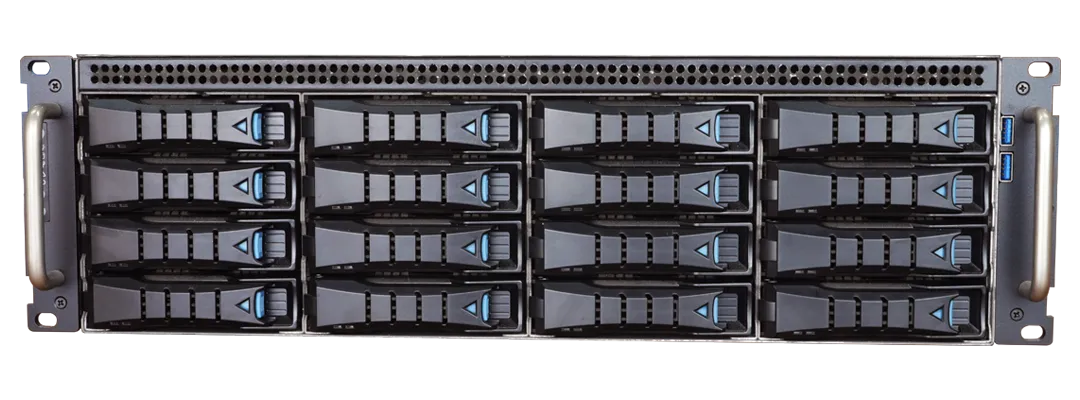
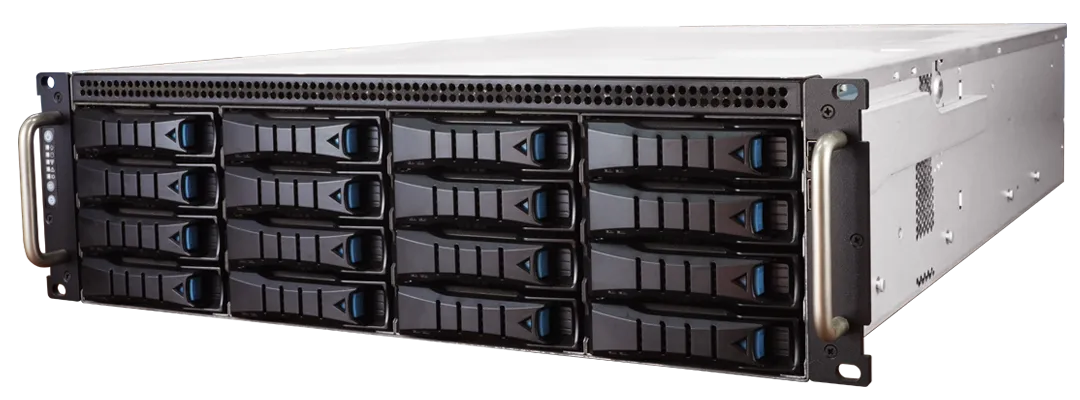
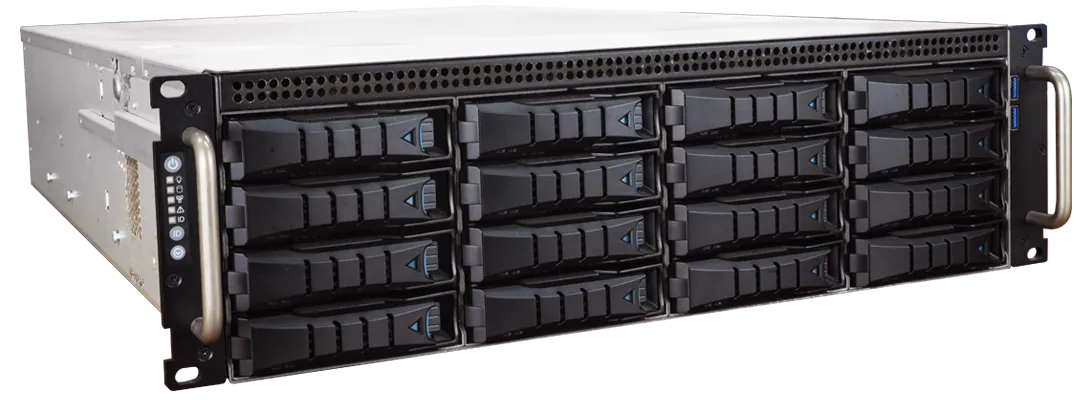
Download Photos
NAV 72CH Recorder
Model:NAV16072E
EOL
- Up to 72 channels 1080p/3M/4M/5M/8M/12M Network streaming, recording
- Paired with AI IPCAM 72 channels
- built-in 1 × 500GB 2.5 Inch SATA SSD (OS)
- Support up to 16 × Hot-swap 3.5 Inch SATA HDD (recording)
- Support failover up to 36 channel per server
- Dual streaming decoding mode supported
-
2 monitors support up to 36 channels in total (480P 15 fps)
- Support multi-channels synchronized playback (remote or local)
- Support Fisheye camera dewarping
-
Built-in dual port 2.5GbE, RJ-45 × 2
- Built-in 800W 1+1 redundant PSU
- 3U dimension for rackmount cabinet
The NAV16072E is a 72-channel next-generation IP network video recorder with an Intel Core i9-12900E and 64GB memory, upgrading both CPU generation and doubling memory compared with the older NAV08072A. It supports 72 IP video inputs with recording in 12MP@20 fps, 8MP@30 fps and other resolutions using H.264, H.265 and MJPEG codecs. The 3U chassis includes a 500GB SSD and supports 16× 3.5-inch SATA drives with LSI SAS RAID control (RAID 0/1/5/6/10/50). It features an RTX3050 display card and 2× 2.5GbE network ports, operates from 0°C to 50°C, runs on 110V–240V redundant power supplies and draws 800W maximum.
Specifications

| Network video support | LILIN IP camera, LILIN IP camera over HTTPS, LILIN Fisheye camera, LILIN IP speed dome, LILIN DVR/NVR, LILIN DHD recorder, NAV live streaming, P2P live streaming, ONVIF camera, manual RTSP, screen capture, USB video input, picture capture |
| Chassis | 3U Chassis |
| IP Video Input | Up to 72 channels 1080p / 3M / 4M / 5M / 8M / 12M |
| Network video Format | H.264 / H.265 / MJPEG |
| Maximum Network Throughput | Upload: up to 1250Mbps, Download: up to 1250Mbps |
| Internal HDD / Swap Drive Bay | built-in 1 × 500GB 2.5 Inch SATA SSD (OS) Support up to 16 × Hot-swap 3.5 Inch SATA HDD (recording) |
| Video input (Support quantity) | Max. 72 channels |
| Camera name | 20 characters |
| Channel editing | Mouse drag-n-drop |
| Fisheye Dewarp Mode | Ceiling and ground mounted, 1 R One Region, 3 R1O Three Regions One Fisheye, 4 R Four Regions, 2 R1P Two Regions One Panoramic 360, 2 P Two Panoramics 180, 8 R1O Eight Regions One Fisheye, Wall mounted, 1 R One Region, 3 R1O Three Regions One Fisheye, 4 R Four Regions, 2 R1P Two Regions One Panoramic 180, 1 WP One Wall Panoramic 180, 8 R1O Eight Regions One Fisheye |
| Digital zoom | Yes, ePTZ supported |
| Privacy Masking | Supported |
| Remote monitoring (Video input) | Yes, web and NAV Client |
| HDMI output | 2 × HDMI Port 2.0, (4096 × 2160@60Hz) |
| DisplayPort output | 2 × DisplayPort 1.4, (4096 × 2160@60Hz) |
| Split Screen | 4, 9, 16, 25, 36 |
| Dual stream technology (Video output) | Multi-channel displays D1 and full screen displays 1080p / 3M / 4M / 5M / 8M / 12M resolution |
| Multi-screen (Video output) | 2 monitors support up to 36 channels in total (480P 15 fps) |
| Application/ Recording Mode | Alarm, motion, schedule, and manual |
| Recording schedule | 7 days × 24 hrs time table, recording mode configurable |
| Recording resolution & framerate | Max 12MP@20 fps, 8MP@30 fps, 5MP@30 fps, 4MP@30 fps, 3MP@30 fps, 1080p@120 fps, and ROI recording supported |
| Alarm recording | Remote digital input, remote IVS detection, remote face detection, remote tamper detection, remote audio detection, external IO, motion detection, NAV CGI Triggering, video loss detection, speed measurement detection, ANPR detection, facial recognition, remote LPR detection, QR code detection, aida behavior detection |
| Audio Recording | Yes |
| Circular recording | Yes / size customizable |
| Limited recording | Yes / days customizable |
| Failover Capability | Supported |
| Video Archiving | Yes |
| Low bitrate recording | Yes |
| NAS | Support NAS (SMB/CIFS), iSCSI |
| Playback Search | Date, time, Smart search, Alarm search, POS, ANPR search, Face search, Face trace search (in FR server only), Tagging search |
| Playback resolution and framerate | Max 12MP@20 fps, 8MP@30 fps, 5MP@30 fps, 4MP@30 fps, 3MP@30 fps, 1080p@120 fps |
| Playback Speed | Fast Rewind: 1/8, 1/4, 1/2, 1X, 2X, 4X, 8X, 16X, 32X Fast Forward: 1/8, 1/4, 1/2, 1X, 2X, 4X, 8X, 16X, 32X |
| Backup / Video input | Max. 36 channels, AVI & MP4 file format supported |
| Remote video (Playback) | NAV Server / Navigator Client / DVR / NVR / IP camera SD card supported up to 36 channels |
| Alarm Management | Play audio file, send email notification, PTZ preset, digital output triggering, full screen, post alarm record, pre-alarm record, advanced alarm digital output, send customizable HTTP POST CGI URL to third party device, alarm ACK, alarm snapshot, text overlay, App cloud push notification, NCC TV wall ACK, NCC eMap Center Alarm, NCC play sound, NCC global alarm setting, all these action can be automatic or scheduled |
| Alarm recording(Alarm / event) | Pre-alarm:1 ~ 10 seconds and post-alarm: 1 sec ~ 59 minutes |
| Alarm scheduling | Up to four alarm tables with AND logic |
| Alarm event actions | Various alarm log including video loss, stop recording, schedule, logon, operation log |
| Digital Output | Controllable via IP cameras |
| Video archiving & sync. | Individual camera configurable, scheduling and instant archiving, sync recording data with NAV server / NVR / DVR / IP camera SD card. |
| Keyboard Keypad | PIH-931D keyboard controllable via rs-485 to usb converter for PTZ, ePTZ, and ROI features |
| Audio | PCM/G.711/AAC, two-way audio, audio recording |
| POS | Third party TCP/IP/ RS-232 / Bluetooth supported / HID USB Barcode scanner |
| Protocols | ARP / TCP/IP / RTSP / ONVIF / HTTP / HTTPS / SMTP / DNS / PPPoE / SDDP |
| Mobile Application | Integrated to LILIN mobile app (LILIN Pro) iPhone, iPad, Android support |
| IP Scan | Supported, easy-to-setup for IP address |
| VMS support | Support NAV Client software |
| eMap | Supported |
| CPU | Intel® Core™ i9-12900E |
| RAM | 64GB (2 × DDR4 32GB) |
| Chipset | Intel® Q670 |
| Display card | 1 × RTX3050 |
| Network ports | 1 x Intel® I225LM with 2.5GbE 1 x Intel® I225LM with 2.5GbE |
| Audio (Hardware) | 3 × Audio jack(s) |
| Rear panel USB port | 5 x USB 3.2 (Gen2) Type-A 1 x USB 3.2 (Gen2x2) Type-C |
| Front panel USB port | 2 x USB 3.0 Type-A |
| System FAN | 3 × System Cooling |
| Hot spare | Supported |
| Raid control | LSI SAS 9361-8i RAID |
| Raid mode | RAID 0, 1, 5, 6, 10, 50 |
| SSD HDD | built-in 1 × 500GB 2.5 Inch SATA SSD (OS) Support up to 24 × Hot-swap 3.5 Inch SATA HDD (recording). Note: Do not use WD Purple HDDs for NAV HDD installation. Please use 7200RPM WD Red Pro for non-RAID installation, WD (Gold) Enterprise HDDs for RAID installation, or other Enterprise HDDs |
| Languages | English, Traditional Chinese, Spanish, German, French, Russian, Japanese, Portuguese, Italian, Simplified Chinese, Slovenian, Czech, Hungarian, Turkish, Arabic, Persian, Bengali, Vietnamese, Polish |
| OS | Windows 11 IoT Enterprise 22H2 GAC |
| Daylight Saving | Daylight saving time by Windows OS |
| Power Consumption | 800W |
| Power Supply | 110V ~ 240V Redundant Power Supply |
| Operating Temperature | 0°C ~ 50°C(32°F ~ 122°F) |
| Storage Temperature | -20°C ~ 70°C(-4°F ~ 158°F) |
| Relative Humidity | 10% ~ 90% (non-condensing) |
| Dimensions | 133 (H) × 430 (W) × 680 (D) mm |
| Color | Black |
| Weight | 75 lbs (34kg) - Gross |
Function-EDGEFENCE
| .AI EDGEFENCE - Recognized objects | Support detection of the following types of human postures: standing, running, squatting, moving forward, crawling, climbing, hatted, under umbrella, etc. Support car vehicle detection |
| .AI EDGEFENCE - Results Display | Support conditional display results according to specified objects |
| .AI EDGEFENCE - Behavior Detection | Density Detection : Support detecting the number of designated objects within a specific area, triggering an event and counting when the set quantity is exceeded. Prohibited Zone with counting : Support triggering an event and counting immediately when a designated object enters a restricted zone. Zone with Dwell with counting : Support triggering an event and counting when a designated object enters a restricted zone and remains there for a specified period of time. Tripwire with counting : Support triggering an event and counting when a designated object crosses a security line. AI missing object detection : Supports triggering an event when a specified object stays in a restricted area for a designated period of time, and also triggers an event when the object disappears or leaves the restricted area and meets the specified time criteria. All Object Detection(AND) : Support detecting and recognizing multiple designated objects within a specified recognition zone, and trigger an event when they are simultaneously present. Lack of any Object Detection (NAND) : Support triggering an event when any of the specified objects is not present within the set detection zone (based on NAND rule) |
| .AI EDGEFENCE - Recognition Speed | Support object recognition speed up to 6 frames per second at 720P |
| .AI EDGEFENCE - Number of Detectable Objects | Can detect up to 18 objects per frame |
| .AI EDGEFENCE - Video Resolution | Support up to higest resolution of this camera for image capture, 720P resolution is used for recognition |
| .AI EDGEFENCE - Object Filtering | Object Type : Support recognizing specified object, instead of processing all types of objects Object Size : Support 0~100% adjustable size of object (compared to frame) for classification Object Confidence Level : Support 0~100% adjustable confidence level of object |
| .AI EDGEFENCE - Event Trigger | Support setting trigger by specific behaviors of specified objects Support setting 8 Cold Zones to minimize false alarms and improve the accuracy |
| .AI EDGEFENCE - Detection Time | After an event is triggered by specified object, the next detection will be carried out according to the set detection time (2~30 seconds) |
| .AI EDGEFENCE - Minimum Recognition Resolution | Support vehicle recognition at 80X80 pixels, person recognition at 80X100 pixels, and motorcycle/bicycle recognition at 80X100 pixels. |
| .AI EDGEFENCE - Detection Zone / Line | Support setting 4 detection zones (about the size of camera FoV) or lines which are influenced by independent filter condition (object size, confidence, dwell, classification and behavior) and to trigger independent events (output) |
| .AI EDGEFENCE - Polygon Detection | Support detection zone which is a polygon that can be freely dragged and that the shape can be modified by 6 draggable anchor points Support detection line which is a line attached to a polygon that the shape can be modified by 4 draggable anchor points. Also, direction of the line can be set by dragging the 4 anchor points or clicking the “Enable direction button” |
| .AI EDGEFENCE - Pixel Count | Support displaying the pixel count of selected object(s) on the web UI |
| .AI EDGEFENCE - Alarm Output | Digital Output : Support triggering digital output of camera Smart Event : Support triggering up to 4 virtual inputs of camera HTTP POST : Support pushing counter values to third-party devices for integration Support displaying an alarm on LILIN IP LED Panel Support displaying an alarm on specific channel of LILIN Navigator VMS Support triggering digital outputs for LILIN I/O Box Support triggering digital outputs for LILIN NVR Support triggering HTTP POST to integrate with third-party devices Support triggering a PTZ camera to go to a preset |
| .AI EDGEFENCE - Heartbeat Checking | Support checking the camera AI operation status and pushing notifications every 1~30 minutes |
| .AI EDGEFENCE - Recording System Integration | Support event search to playback or snapshot on LILIN Navigator VMS and NVR |
| .AI EDGEFENCE - API Integration | Support API integration with third-party VMS and provide camera SDK files |
| .AI EDGEFENCE - Interface Language | Support Traditional Chinese, English, Japanese and Italian |
| .AI EDGEFENCE - Supported Cameras | LILIN Z6/P6 series cameras (excluding vehicle-mounted P6R37 series cameras) |
Function-EDGEDENSITY
| .AI EDGEDENSITY - Recognized objects | Support detection of the following types of human postures: standing, running, squatting, moving forward, crawling, climbing, hatted, under umbrella, etc. Support car vehicle detection |
| .AI EDGEDENSITY - Results Display | Support conditional display results according to specified objects |
| .AI EDGEDENSITY - Counter Function | Counter : Support 8 counters that start counting when a specified object trigger(s) an event Reset value : Support setting the initial value of a counter(s), and the event trigger starts counting from the initial value Operand : Expressions such as +1, -1, and = can be used as the counter counting method Reset Every : Counter(s) reset cycle can be set to: 1 minute, 5 minutes, 30 minutes, 1 hour, 1 day, 1 week, 1 month, etc., and the counter can be reset to the initial value according to the cycle Counter triggering >= : When performing density detection, the number of objects that trigger the event can be set (up to 300); when the number of recognized objects reaches the specified number, the event is triggered and the counter starts to count |
| .AI EDGEDENSITY - Behavior Detection | Density Detection : Support detecting the number of designated objects within a specific area, triggering an event and counting when the set quantity is exceeded. Prohibited Zone with counting : Support triggering an event and counting immediately when a designated object enters a restricted zone. Zone with Dwell with counting : Support triggering an event and counting when a designated object enters a restricted zone and remains there for a specified period of time. Tripwire with counting : Support triggering an event and counting when a designated object crosses a security line. AI missing object detection : Supports triggering an event when a specified object stays in a restricted area for a designated period of time, and also triggers an event when the object disappears or leaves the restricted area and meets the specified time criteria. All Object Detection(AND) : Support detecting and recognizing multiple designated objects within a specified recognition zone, and trigger an event when they are simultaneously present. Lack of any Object Detection (NAND) : Support triggering an event when any of the specified objects is not present within the set detection zone (based on NAND rule) |
| .AI EDGEDENSITY - Recognition Speed | Support object recognition speed up to 6 frames per second at 720P |
| .AI EDGEDENSITY - Number of Detectable Objects | Can detect up to 18 objects per frame |
| .AI EDGEDENSITY - Video Resolution | Support up to higest resolution of this camera for image capture, 720P resolution is used for recognition |
| .AI EDGEDENSITY - Object Filtering | Object Type : Support recognizing specified object, instead of processing all types of objects Object Size : Support 0~100% adjustable size of object (compared to frame) for classification Support 0~100% adjustable size of object (compared to frame) for behavior detection Object Confidence Level : Support 0~100% adjustable confidence level of object |
| AI EDGEDENSITY - Event Trigger | Support setting trigger by specific behaviors of specified objects Support setting 8 Cold Zones to minimize false alarms and improve the accuracy |
| .AI EDGEDENSITY - Detection Time | After an event is triggered by specified object, the next detection will be carried out according to the set detection time (2~30 seconds) |
| .AI EDGEDENSITY - Minimum Recognition Resolution | Support vehicle recognition at 80X80 pixels, person recognition at 80X100 pixels, and motorcycle/bicycle recognition at 80X100 pixels. |
| .AI EDGEDENSITY - Detection Zone / Line | Support setting 4 detection zones (about the size of camera FoV) or lines which are influenced by independent filter condition (object size, confidence, dwell, classification and behavior) and to trigger independent events (output) |
| .AI EDGEDENSITY - Polygon Detection | Support detection zone which is a polygon that can be freely dragged and that the shape can be modified by 6 draggable anchor points Support detection line which is a line attached to a polygon that the shape can be modified by 4 draggable anchor points. Also, direction of the line can be set by dragging the 4 anchor points or clicking the “Enable direction button” |
| .AI EDGEDENSITY - Pixel Count | Support displaying the pixel count of selected object(s) on the web UI |
| .AI EDGEDENSITY - Alarm Output | Digital Output : Support triggering digital output of camera Smart Event : Support triggering up to 4 virtual inputs of camera HTTP POST : Support pushing counter values to third-party devices for integration Support displaying an alarm on LILIN IP LED Panel Support displaying an alarm on specific channel of LILIN Navigator VMS Support triggering digital outputs for LILIN I/O Box Support triggering digital outputs for LILIN NVR Support triggering HTTP POST to integrate with third-party devices Support triggering a PTZ camera to go to a preset |
| .AI EDGEDENSITY - Heartbeat Checking | Support checking the camera AI operation status and pushing notifications every 1~30 minutes |
| .AI EDGEDENSITY - Recording System Integration | Support event search to playback or snapshot on LILIN Navigator VMS and NVR |
| .AI EDGEDENSITY - API Integration | Support API integration with third-party VMS and provide camera SDK files |
| .AI EDGEDENSITY - Interface Language | Support Traditional Chinese, English, Japanese and Italian |
| .AI EDGEDENSITY - Supported Cameras | LILIN Z6/P6 series cameras (excluding vehicle-mounted P6R37 series cameras) |
Downloads